

Sometimes the honest answer to “why is my R slow?” is that the computation is a genuine loop, each step needing the last, and no amount of vectorizing will change that. For exactly those cases, R keeps an escape hatch with a beautiful power-to-effort ratio: Rcpp.
The idea: write the one hot function in C++, and Rcpp compiles it and welds it into your session as if it were a normal R function. Everything else — data wrangling, plotting, the whole comfortable tidy world — stays in R. You’re not rewriting your project in C++. You’re extraditing one guilty function.
Why does it work? R is interpreted; every pass through an R loop pays interpreter overhead per element. C++ is compiled to machine code before it runs, so a loop is just a loop. For scalar-heavy, iteration-heavy work the difference is routinely 10–100x.
Here’s the entire workflow, using a cumulative-sum-with-a-twist that genuinely can’t be vectorized (each element depends on the previous output):
install.packages("Rcpp")
library(Rcpp)

cppFunction('
NumericVector decayCumsum(NumericVector x, double decay) {
  int n = x.size();
  NumericVector out(n);
  out[0] = x[0];
  for (int i = 1; i < n; i++) {
    out[i] = x[i] + decay * out[i - 1];
  }
  return out;
}
')

x <- runif(1e7)
system.time(decayCumsum(x, 0.9))   # ~0.02s

# The same function in pure R
decayR <- function(x, decay) {
  out <- numeric(length(x)); out[1] <- x[1]
  for (i in 2:length(x)) out[i] <- x[i] + decay * out[i - 1]
  out
}
system.time(decayR(x, 0.9))        # ~0.46s on the same machine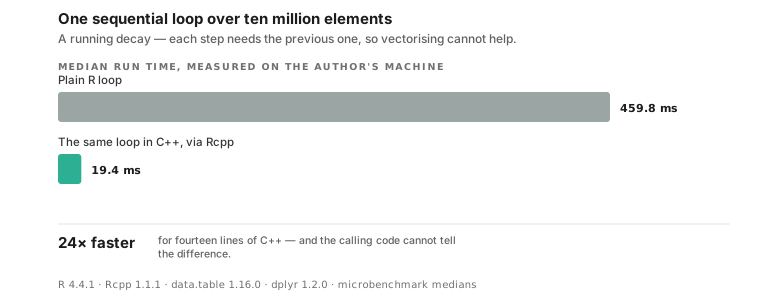
Twenty-four times faster for fourteen lines of C++, and the calling code can’t tell the difference. cppFunction handles the compiling, the type bridging and the loading, which are the parts that made “just write it in C” a week-long detour in the old days.
That number used to be a hundred, and I’d have repeated it if I hadn’t re-run the benchmark for this figure. R grew a byte-code compiler that’s been on by default since version 3.4, and it’s very good at exactly this shape of loop. Turn it off with compiler::enableJIT(0) and the R side goes back to 5.5 seconds, which is where the old hundred-fold figure came from. So the escape hatch is still worth having — it just has a smaller gap to jump than it used to, and the honest version of the claim is the one you measured this morning.
When should you actually reach for this? My rule has three parts. Profile first, because the slow part is never where you think (Rprof or the profvis package will tell you). Vectorize second, because if the loop can become a vector operation, that’s free speed with no toolchain. Rcpp third, for the loops that survive: simulations, recursive filters, MCMC innards, tree traversals.
And when shouldn’t you? When the bottleneck is I/O or memory rather than CPU, because C++ won’t make your disk faster. When the R version runs in eight seconds once a month. The maintenance cost of a second language in the project is real, and somebody who doesn’t know C++ will inherit this someday. Speed you don’t need is complexity you paid for anyway.
But when the profile says one function is eating ninety percent of an hour-long run? Fourteen lines. It still feels like cheating.